Device management
Device manager overview
The Device Manager page shows all devices attached to your company and allows you to manage them
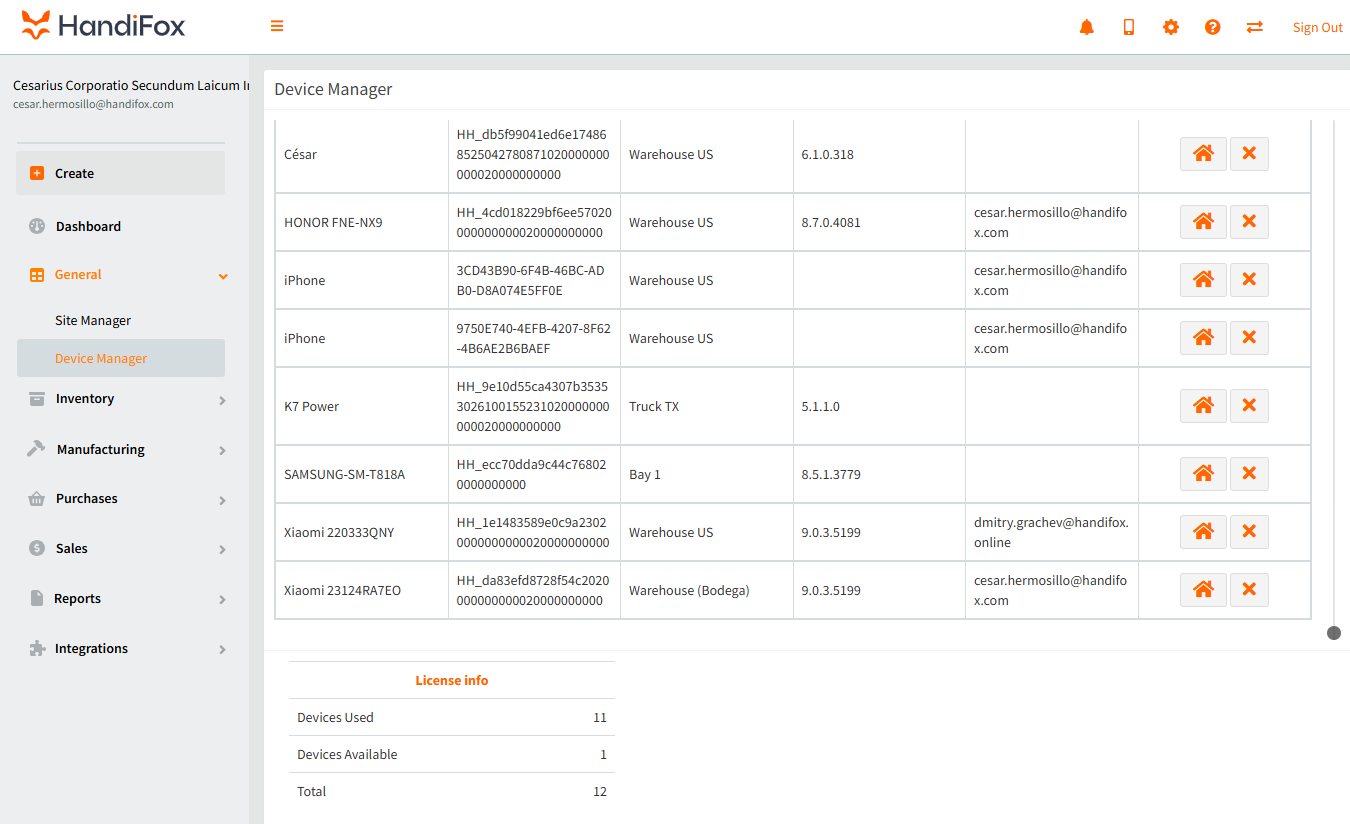
The information provided includes several columns, the most useful of which are: Device Name to identify the device, Associated Site to show site assigned to the device, Trans prefix to identify transactions created on different devices and User to indicate which user is working with each device
Adding and removing devices
A new device is automatically added to your HandiFox company after the first synchronization is completed on the device.
User selects Site and assigns it to the device before the first synchronization, and the site can be changed later. However, if you disable Setting to let user switch between sites, it is possible to change site through the Device Manager in the web app by person with Manager or Owner role. Keep in mind that the user will need to reinstall the app for this change to take effect.
Click on this icon to switch sites for your user
To remove device click on  in the corresponding device row. Deleted device can always be added back to the company but make syre device is synchronized to prevent data loss.
Device licenses
Amount of available devices depends on your current Subscription plan.
Under License info, you will see the total number of devices in your company, number of used licenses, and number of licenses avaiallbe for adding new device.
Under License info, you will see the total number of devices in your company, number of used licenses, and number of licenses avaiallbe for adding new device.
If you are switching to new device you need to delete of on you devices from Device manager to vacate a license.